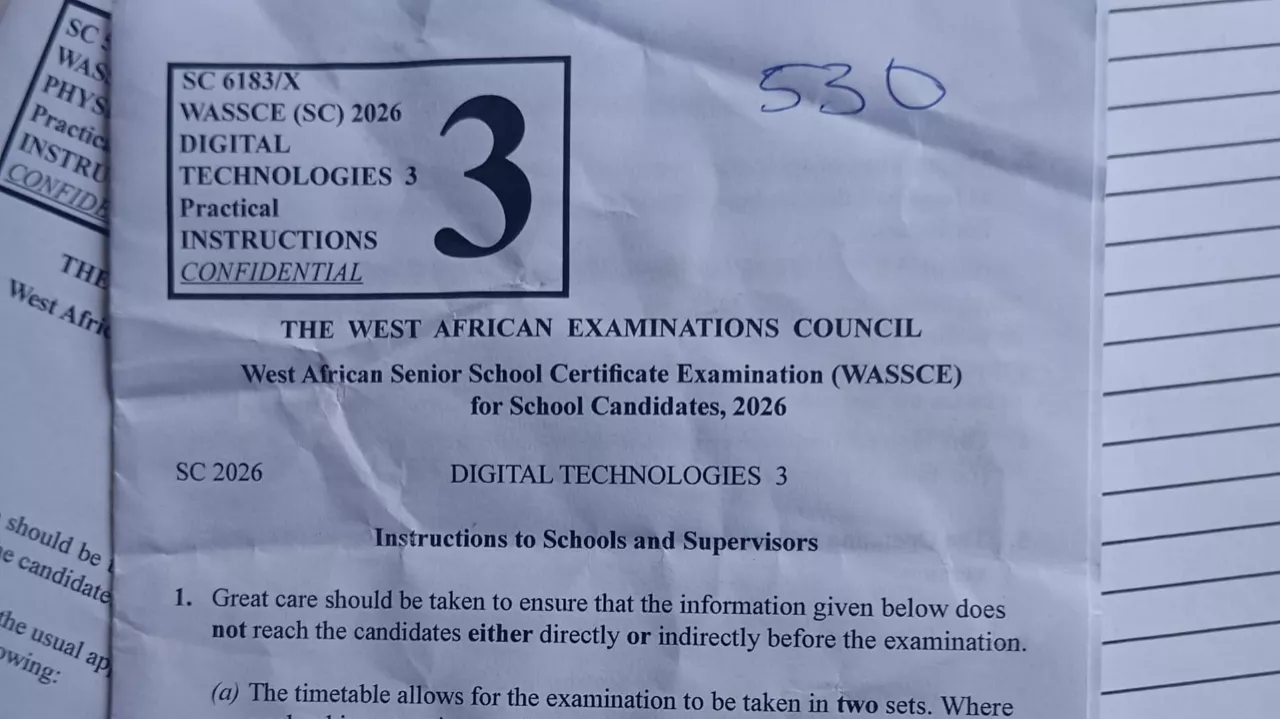
The West African Examinations Council (WAEC) has released the official instructions and requirements for the 2026 WASSCE Digital Technologies Practical Examination. The practical examination is designed to assess candidates’ ability to use computer systems, software applications, and digital tools to solve practical problems.
Candidates preparing for the WAEC Digital Technologies Practical examination which will take place on Monday 8th June, 2026 are advised to familiarize themselves with the practical environment, required software applications, and examination procedures before the examination date.
According to the instructions released by WAEC, schools are expected to provide the necessary hardware, software, networking facilities, and printing equipment required for the smooth conduct of the examination.
The Digital Technologies Practical examination forms an important part of the overall assessment and gives candidates an opportunity to demonstrate their practical computing skills.
In this guide, zamgist provide the complete WAEC Digital Technologies Practical requirements, hardware and software specifications, examination instructions, and important guidelines for schools and candidates.

CLICK HERE TO CHAT ME UP ON WHATSAPP TO PAY ₦1000 & GET IT NOW
WAEC Digital Technologies Practical Examination Overview
The WAEC Digital Technologies Practical Examination is designed to evaluate candidates’ ability to perform practical computer-based tasks using modern digital tools and software applications.
Unlike the theory paper, which focuses on concepts and principles, the practical examination tests candidates’ ability to apply their knowledge in real-life situations using computer systems.
What Is WAEC Digital Technologies Practical?
The Digital Technologies Practical is a computer-based examination that requires candidates to use software applications and digital resources to complete assigned tasks.
The examination may involve activities such as:
- Word processing and document creation.
- Spreadsheet calculations and data analysis.
- Database management tasks.
- Presentation design and slide creation.
- Graphics and design using CorelDraw.
- General computer operation and file management.
Importance of the Practical Examination
The practical examination plays a significant role in determining a candidate’s overall performance in Digital Technologies.
It helps WAEC assess:
- Practical computer literacy skills.
- Problem-solving abilities.
- Knowledge of productivity software.
- Ability to work independently on computer-based tasks.
- Application of classroom knowledge in practical situations.
Candidates who practice regularly with the required software applications stand a better chance of performing well in the examination.
WAEC Digital Technologies Practical Requirements 2026
To ensure a successful practical examination, WAEC requires schools to provide specific equipment, facilities, and materials for candidates.
These requirements are intended to create a suitable environment for practical testing and ensure that candidates can complete their tasks without unnecessary interruptions.
General Requirements
Each candidate should have access to the following:
- Functional computer systems.
- Printing facilities.
- Local Area Network (LAN) connectivity where applicable.
- Required software applications.
- Mathematical tables or calculators.
- Geometrical instruments.
Why These Requirements Are Important
The practical examination focuses on hands-on activities that require candidates to interact directly with computer systems and software.
Without the necessary equipment and facilities, candidates may be unable to complete the practical tasks effectively.
Schools are therefore expected to ensure that all systems are properly configured and tested before the examination date.
Additionally, candidates should take time to familiarize themselves with the software packages that will be used during the examination to improve their confidence and performance.
Meeting these requirements helps ensure a smooth, fair, and successful Digital Technologies Practical Examination for all candidates.
Hardware and Software Required for WAEC Digital Technologies Practical 2026
According to the official WAEC instructions for schools, candidates must be provided with adequate computer facilities and software applications to enable them complete the Digital Technologies Practical Examination successfully.
The examination is computer-based and requires candidates to perform practical tasks using various software packages and digital tools.
Hardware Requirements
Schools presenting candidates for the examination are expected to provide the following hardware facilities:
- Functional computer systems.
- Local Area Network (LAN) connectivity.
- High-performance printers.
- Additional standby computers.
- Mathematical tables or calculators.
- Geometrical instruments.
All computers should be in good working condition and capable of running the required software applications without interruption.
Software Requirements
WAEC has specified the minimum software applications that must be installed on each computer used for the examination.
The required software includes:
- Microsoft Word 2007 or higher.
- Microsoft Excel 2007 or higher.
- Microsoft Access 2007 or higher.
- Microsoft PowerPoint 2007 or higher.
- CorelDraw.
The operating system installed on the computers should be Windows 7 or any higher version.
Schools are advised to verify all software installations before the examination date to avoid technical issues during the practical session.
Minimum Computer Requirements for Schools
WAEC has outlined the minimum number of computers that schools must provide based on the number of candidates registered for the Digital Technologies Practical Examination.
The purpose of this requirement is to ensure that candidates have adequate access to computer systems throughout the examination.
Computer-to-Candidate Ratio
The number of computers available must be at least half the number of candidates registered for the examination.
Examples provided by WAEC include:
- A school presenting 20 candidates must provide at least 10 computers.
- A school presenting 55 candidates must provide at least 28 computers.
Networking Requirement
All computers used for the practical examination should be connected through a Local Area Network (LAN).
This helps facilitate file sharing, printing, and efficient management of examination activities.
Printer Requirement
WAEC requires that one high-performance printer be connected to a maximum of ten computers.
This means the printer-to-computer ratio should not exceed 1:10.
Standby Computers
Schools are encouraged to provide additional computers on standby in case of equipment failure during the examination.
Having backup systems helps prevent unnecessary disruptions and ensures that candidates can continue their work without significant delays.
Software Packages Required for the Examination
Every computer designated for the WAEC Digital Technologies Practical Examination must have the following software packages installed and functioning properly.
| Software Package | Minimum Version Required |
|---|---|
| Microsoft Word | 2007 or Higher |
| Microsoft Excel | 2007 or Higher |
| Microsoft Access | 2007 or Higher |
| Microsoft PowerPoint | 2007 or Higher |
| CorelDraw | Installed Version |
Functions of the Required Software Packages
Microsoft Word: Used for creating, editing, and formatting documents.
Microsoft Excel: Used for calculations, data analysis, charts, and spreadsheet tasks.
Microsoft Access: Used for database creation, record management, and data queries.
Microsoft PowerPoint: Used for creating presentations and slide shows.
CorelDraw: Used for graphics design, illustrations, and visual content creation.
Candidates are strongly advised to practice with these applications before the examination, as WAEC may test various features and functions within them during the practical exercise.
Familiarity with these software packages can significantly improve candidates’ speed, confidence, and overall performance in the examination.
WAEC Digital Technologies Practical Instructions to Schools
WAEC has provided detailed instructions that schools must follow to ensure the smooth conduct of the 2026 Digital Technologies Practical Examination.
School administrators, supervisors, and invigilators are expected to strictly comply with these guidelines before, during, and after the examination.
1. Examination May Be Conducted in Two Sets
According to WAEC, the examination timetable allows the practical examination to be conducted in two separate sets where necessary.
If a school presents candidates in more than one batch, the supervisor must ensure that all traces of candidates’ work from the first batch are permanently deleted before the second batch begins.
2. Additional Time for Printing
Candidates should be given an additional five (5) minutes at the end of the examination to print their completed or unfinished practical solutions.
This helps ensure that all candidates are able to submit their work properly.
3. Collection of Printouts
Invigilators should collect candidates’ printed copies directly from the printers and hand them over to the candidates.
This procedure helps prevent overcrowding and unnecessary movement around the printing area.
4. Submission of Printouts
After receiving their printouts, candidates are required to submit them directly to the supervisor.
5. Authentication of Printouts
Each candidate’s printout must be signed by the supervisor before submission.
This serves as verification that the printed work belongs to the candidate.
6. Restriction on Storage Devices
Schools must ensure that candidates do not bring any external storage devices into the examination hall.
Prohibited devices include:
- Flash drives (USB drives).
- Compact discs (CDs).
- Memory cards.
- External hard drives.
- Any other storage media.
These restrictions help maintain the integrity and security of the examination.
Assistance to Candidates During the Practical Examination
WAEC recognizes that some candidates may encounter difficulties while carrying out practical tasks during the examination.
As a result, certain forms of assistance may be provided under strict conditions.
Purpose of Candidate Assistance
The objective of the Digital Technologies Practical Examination is to determine whether candidates can independently perform practical tasks using computer systems and software applications.
However, where a candidate experiences difficulties due to misunderstanding of an instruction or practical procedure, limited assistance may be provided.
Conditions for Providing Assistance
WAEC has established the following rules:
- No hints should be announced to all candidates at once.
- Assistance must be given only to the specific candidate who requires it.
- The candidate must personally approach the examiner or supervisor to request assistance.
- The examiner may provide guidance that enables the candidate to continue working.
Documentation of Assistance
Whenever assistance is provided, the examiner must record the details in the official report form.
The following information should be documented:
- Candidate’s name.
- Candidate’s index number.
- Nature of assistance provided.
WAEC may review such reports during marking and moderation.
Important Notice to Candidates
Candidates who are unable to proceed with a practical task after spending a reasonable amount of time on it may approach the examiner for assistance.
However, receiving assistance may affect the marks awarded for that particular task.
Candidates are therefore encouraged to prepare thoroughly before the examination.
RELATED POST
WAEC Digital Technology 2026 Questions And Answer
WAEC Biology Practical Specimens 2026
WAEC 2026 Chemistry Practical Specimens (Alternative A)
WAEC Agricultural Science Practical Specimens 2026
WAEC Livestock Farming Specimen 2026
How To Upload O’Level Result on JAMB Portal 2026
How To Accept or Reject Admission on JAMB CAPS 2026
Conclusion
The WAEC Digital Technologies Practical Examination 2026 is designed to test candidates’ ability to apply digital skills and computer knowledge in solving practical problems. Success in this examination requires not only theoretical understanding but also hands-on experience with the software applications and tools specified by WAEC.
Candidates are strongly advised to begin their preparations early by practicing regularly with Microsoft Word, Microsoft Excel, Microsoft Access, Microsoft PowerPoint, and CorelDraw. Familiarity with these applications will help improve speed, accuracy, and confidence during the examination.
It is equally important to understand the practical procedures, file management techniques, formatting skills, spreadsheet calculations, database operations, presentation design, and basic graphic design concepts that may be tested.
Schools should ensure that all required computer systems, printers, networking facilities, and software packages are available and functioning properly before the examination date. Proper preparation by both candidates and schools will contribute significantly to a smooth and successful practical examination.
We will continue to update this page with any new information regarding the WAEC Digital Technologies Practical Examination 2026. Candidates are encouraged to bookmark this page and visit regularly for updates, likely practical questions, revision guides, and examination tips.
Zamgist wish all WAEC candidates success in their 2026 Digital Technologies Practical Examination.

Zamgist Education Desk is the editorial team behind Zamgist, providing reliable and practical updates on JAMB, WAEC, NECO, admissions, scholarships, recruitment and other education-related opportunities in Nigeria. Our content is researched from official and reliable sources and updated when important information changes.