The West African Examination Council (WAEC) has scheduled the WAEC Computer Hardware and GSM Repairs 2026 paper. Below are the questions and verified answers to help candidates understand the exam content.
WAEC Computer Hardware and GSM Repairs 2026 Questions And Answers
SECTION A – ESSAY
Question 1
(a)(i) State TWO reasons for setting up factory reset protection (FRP) lock on a smartphone
Answer:
1. To prevent unauthorized access to the phone after factory reset.
2. To protect personal files and information stored on the phone.
(a)(ii) State THREE steps to enable pattern lock on an Android phone
Answer:
1. Open Settings on the Android phone.
2. Select Security or Lock Screen, then choose Pattern lock.
3. Draw the desired pattern and confirm it to activate the lock.
(b)(i) Explain briefly the term collateral as it relates to setting up a GSM phone repair business
Answer:
Collateral is a valuable property or asset pledged as security for obtaining a loan to start or expand the GSM phone repair business. It is an item the lender can seize if the borrower fails to repay the loan.
(b)(ii) State THREE factors that can hinder the success of a GSM phone repair business
Answer:
1. Inadequate capital or finance.
2. Lack of technical skills or experience.
3. Poor location of the business shop.
Question 2
(a)(i) Complete the diagram in Fig. 1 (Charging section of a mobile phone)
Answer:
The missing labels in the block diagram are:
– Charger
– Charging voltage control circuit
– Application processor
– Voltage protection circuit
– Battery temperature detector
(a)(ii) What type of diagram is Fig. 1?
Answer: Block diagram.
(b) State the steps to take when an electrical fire occurs in a phone repair workshop
Answer:
1. Switch off the electrical power supply if possible.
2. Use a CO₂ or dry powder extinguisher only.
3. Pull the safety pin and aim the nozzle at the base of the fire.
4. Press the handle and sweep the extinguisher from side to side until the fire goes out.
Question 3
(a)(i) State THREE causes of touchscreen malfunction on a smartphone
(a)(i) State TWO possible causes why an Android phone user was unable to download applications from Play Store
Answer:
1. Poor or no internet connection.
2. Insufficient storage space on the device.
(a)(ii) State the solution to each cause stated in 5(a)(i)
Answer:
1. Connect the phone to a stable internet connection.
2. Delete unwanted files or applications to create sufficient storage space.
(b)(i) What is business risk as it relates to running a phone repair business?
Answer:
Business risk is the chance that a phone repair business may not achieve its expected profit or may experience losses because of uncertainties or unforeseen problems in the business.
(b)(ii) State TWO factors that significantly contribute to the success of a phone repair business
Answer:
1. Good technical skills and experience.
2. Availability of quality repair tools and equipment.
SECTION B – ALTERNATIVE TO PRACTICAL WORK
Question 6 (Fig. 2 – Mobile Phone Charging Flex Board)
(a)(i) Identify the section in Fig. 2
Answer: Charging flex board.
(a)(ii) Name ONE component that connects the section in Fig. 2 to the phone PCB
(d)(ii) State the function performed by the components in Fig. 3 in a mobile phone
Answer: They store and supply electrical power to the mobile phone.
(d)(iii) State THREE symptoms that may be observed if the components in Fig. 3 are faulty
Answer:
1. The phone will not power on.
2. The battery drains quickly.
3. The phone will not charge properly.
(d)(iv) State ONE advantage of component X over component Y
Answer: Internal battery (X) allows for a slimmer and more compact phone design.
(d)(iv) State TWO advantages of component Y over component X
Answer:
1. Removable battery (Y) can be easily replaced by the user without professional help.
2. A spare removable battery can be carried and swapped when the phone runs out of power.
(a)(i) Name the operation ongoing on the phone in Fig. 4
Answer: Recovery mode.
(a)(ii) What brand of phone is the operation being carried out on?
Answer: iPhone (Apple).
(a)(iii) List TWO repair activities that require the operation ongoing on the phone in Fig. 4
Answer:
1. Fixing phone firmware corruption.
2. Removing boot loop or system crash problems.
(a)(iv) Outline the steps to be taken to achieve the operation displayed in Fig. 4
Answer:
1. Switch off the iPhone.
2. Press and hold the Home button (or volume button for newer models).
3. Connect the phone to a computer using a USB cable while still holding the button.
4. Release the button when the recovery mode screen appears, then use iTunes or Finder to restore the phone.
(a)(v) State ONE precaution that should be taken while carrying out repairs on the phone in Fig. 4
Answer: Ensure the phone battery is adequately charged before the restoration process begins.
(b)(i) Identify the tool in Fig. 5
Answer: UFS Box (Universal Flashing System Box).
(b)(ii) State ONE function of the tool in Fig. 5
Answer: Flashing or installing phone firmware.
(b)(iii) Name the device to which the tool in Fig. 5 is connected while carrying out repair operations
Answer: Computer system (PC/laptop).
(b)(iv) State THREE faults in a mobile phone that will require the use of the tool in Fig. 5
(b)(v) List in sequential order the steps to be taken when using the tool in Fig. 5 in a repair operation
Answer:
1. Connect the UFS box to the computer system.
2. Install and open the flashing or software repair application.
3. Connect the mobile phone to the UFS box using the appropriate cable.
4. Select the correct firmware file or model of the phone.
5. Start the flashing process and wait for completion.
(b)(vi) State ONE precaution that should be taken while using the tool in Fig. 5
Answer: Ensure stable power supply and do not disconnect the phone during the flashing process.
How to Get WAEC Computer Hardware and GSM Repairs 2026 Questions And Answers
In this section, you will read the steps and requirements needed for you to get WAEC Computer Hardware and GSM Repairs 2026 Questions And Answers before exam.
WAEC Computer Hardware and GSM Repairs 2026 Paper is Categorized in to 2 parts:
WAEC Computer Hardware and GSM Repairs Essay 2026
WAEC Computer Hardware and GSM Repairs Objective 2026
Computer Hardware and GSM Repairs WAEC 2026 Questions And Answers
WAEC Computer Hardware and GSM Repairs Expo 2026
==> WhatsApp ₦1000 MTN CARD
Whatsapp MEANS The answer will be sent to you on WhatsApp after we confirm your subscription. Add Us In WhatsApp With +2349017746445.
==> Online PIN: ₦1000 MTN CARD
Online PIN MEANS The Pin to access our answers online via https://zamgist.net will be sent to u at least 4 hours before the exam to access our answers.
Send The Following details:-
(i) MTN CARD Pin(s)
(ii) Your Name
(iii) Subject
(iv) Phone number
===> 09017746445 via WhatsApp or SMS
RELATED:
NOTE:- All SMS sent to the above number are attended to. always send us WhatsApp message of your complaint, your message(s) will get to us and we will reply
 Zamgist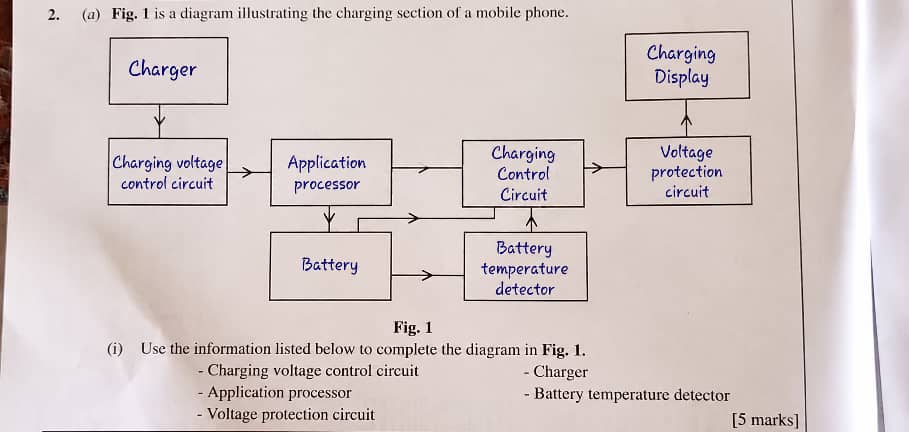


 Zamgist