Are you trying to access your TVET dashboard login Nigeria 2026 but keep facing errors or confusion? You are not alone. Thousands of applicants across Nigeria are currently searching for how to check their TVET application status, confirm admission, or fix login problems on the portal.
The Technical and Vocational Education and Training (TVET) programme is a major opportunity introduced by the Federal Government to help Nigerians gain practical skills and secure better job opportunities. But after applying, many candidates struggle with issues like incorrect login details, dashboard not loading, or not knowing where to check their status.
If you are among those asking how to check TVET status or why your dashboard is not showing updates, this guide will walk you through everything you need to know.
In this post, you will learn step-by-step how to log in to your TVET dashboard, check your application status, recover your account, and fix common login problems quickly and easily.
TVET 2026 Latest Update
The Federal Government of Nigeria has officially opened applications for the TVET 2026 programme (Second Cohort), giving thousands of Nigerians another opportunity to gain practical, job-ready skills.
Application Start Date: April 13, 2026 (4:00 PM WAT)
This new phase of the Technical and Vocational Education and Training (TVET) initiative is part of the national effort to reduce unemployment and empower youths with hands-on skills across different industries.
According to Tunji Alausa, the programme aligns with the government’s broader vision to strengthen human capital development and improve access to vocational training nationwide.
The initiative is also linked to the Renewed Hope Agenda of Bola Ahmed Tinubu, which focuses on creating more opportunities for young Nigerians through education, skills acquisition, and employment support.
Due to the high number of applicants, the TVET portal may sometimes be slow or experience delays. However, the dashboard remains active, and all applicants are advised to keep checking regularly for updates on their application status, training placement, and notifications.
This update confirms that the TVET dashboard login Nigeria 2026 portal is fully active, and candidates can now access their accounts to track progress and stay informed.
TVET Dashboard Login Portal
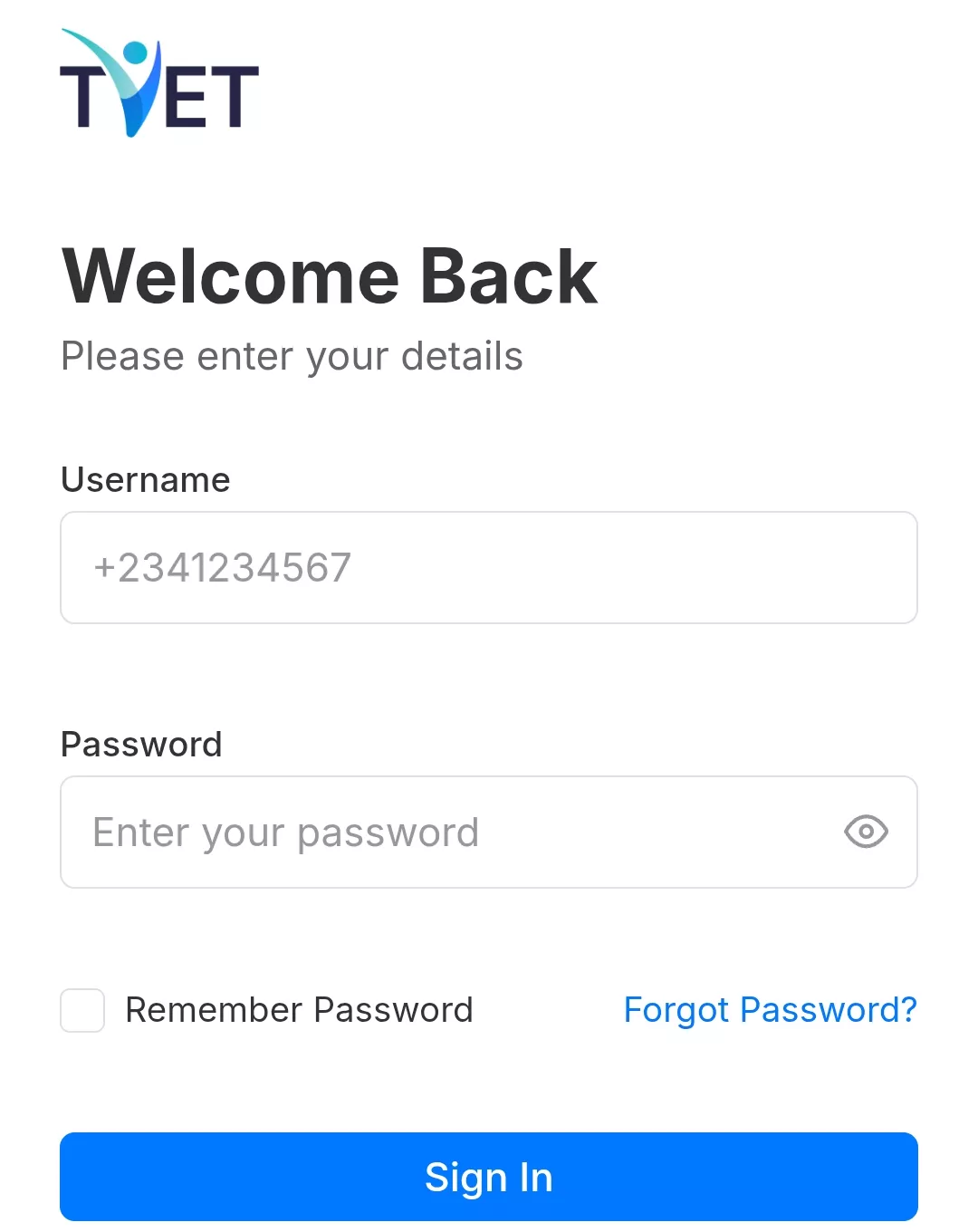
To access your dashboard and check your application status, use the official TVET login portal below:
Official Login Portal: https://www.tvet.education.gov.ng/login
Login Method:
To sign in successfully, you will need:
- Your registered phone number
- Your password
Once you enter these details correctly, you will be taken directly to your personal dashboard where you can view your application status, training updates, and important notifications.
What is the TVET Dashboard?
The TVET dashboard is your personal student portal on the official TVET platform in Nigeria.
It is where you manage everything related to your application and training.
Through your dashboard, you can:
- Check your application status
- View training updates
- Read important notifications and messages
In simple terms, your TVET dashboard is your control center. All information about your application will appear there.
Requirements to Access TVET Dashboard
Before you log in, make sure you have the following:
- Your registered phone number
- Your password
- A stable internet connection
- A device (smartphone, laptop, or desktop)
Once you have these ready, you can log in without any issues and access your dashboard easily.
How to Check Your TVET Dashboard
Follow these simple steps to access your dashboard and check your application status:
- Visit the official portal
Go to: https://www.tvet.education.gov.ng/ - Click on “Login”
You will find the login option on the homepage. - Enter your details
- Your registered phone number
- Your password
- Click “Sign In”
Make sure your details are correct before submitting. - View your dashboard
Once logged in, you can check your application status, updates, and notifications instantly.
Direct Login Method
To save time and avoid unnecessary steps, you can go straight to the login page:
Direct Login Link: https://www.tvet.education.gov.ng/login
Just enter your phone number and password, then click Sign In to access your dashboard immediately.
This method helps you skip the homepage, making the process faster and smoother, especially when the site is experiencing heavy traffic.
How to Recover TVET Password
Forgot your password? Don’t worrt, you can easily reset it and regain access to your dashboard.
Follow these steps:
- Click on “Forgot Password” on the login page
- Enter your registered phone number
- Provide your NIN (National Identification Number)
- Click “Reset” and create a new password
Make sure the phone number and NIN you enter match exactly with the details you used during registration.
After resetting, go back to the login page and sign in with your new password.
Why You Can’t Access Your TVET Dashboard
If you’re having trouble logging in, here are the most common reasons and how to fix them:
Wrong Phone Number
Your phone number is your login ID. Even a small mistake will prevent access.
Double-check the exact number you used during registration.
Incorrect Password
Typing errors or forgotten passwords are very common.
- Turn off CAPS LOCK
- Re-enter carefully
- Use “Forgot Password” if needed
Portal Down or Slow
Due to high traffic, the TVET portal may temporarily stop working.
- Wait and try again later
- Switch browser (Chrome, Firefox)
- Use a better internet connection
Account Not Activated
Some users may not have completed full registration.
- Ensure all steps are completed
- Check your messages or email for confirmation
NIN Mismatch
If your NIN details don’t match your registration info, access may be blocked.
- Ensure your name, date of birth, and details match your NIN exactly
These are the most searched issues related to TVET dashboard login Nigeria 2026, and fixing them will help you access your dashboard quickly without stress.
How to Fix TVET Login Problems
If you are still unable to access your dashboard, apply these simple fixes:
Double-check your details: Make sure your phone number and password are entered correctly (no extra spaces or wrong digits).
Reset your password: Use the “Forgot Password” option if you’re unsure of your login details.
Try another browser or device: Switch to Chrome, Firefox, or use a different phone/laptop to rule out technical issues.
Wait for portal update: Sometimes the system may be slow due to heavy traffic. Give it some time and try again later.
These quick fixes solve most TVET dashboard login Nigeria 2026 problems.
What You Can Do on TVET Dashboard
Once you successfully log in, your dashboard gives you full access to manage your application:
- Check your application status (Approved, Pending, or Rejected)
- Download your TVET ID card
- Select your training centre
- Upload required documents
You can also view updates, notifications, and important instructions related to your training.
How to Check TVET Admission Status
To confirm whether you’ve been selected, follow these steps:
- Login to your TVET dashboard
Use your registered phone number and password. - Go to “Application Status” section
This is where your admission update will appear. - Check your status
Here is what each status means:
- Approved: Congratulations! You have been selected. Follow the next instructions on your dashboard.
- Pending: Your application is still under review. Keep checking regularly.
- Rejected: You were not selected for this cohort.
Why Your Dashboard Is Not Updating
If your dashboard is not showing updates, don’t panic, this is very common.
Here are the main reasons:
System delay: The portal may take time to update due to technical processing.
Application under review: Your details are still being checked by the system.
High traffic: Thousands of applicants are accessing the portal at the same time.
It is completely normal for updates to delay. Just keep checking your dashboard regularly, your status will appear once processing is complete.
YOU MAY LIKE
- CDCFIB Shortlist 2026: Check Names, CBT Results & Physical Screening Updates
- Nigeria Police Recruitment 2026 CBT Exam Date, Requirements & How to Print Slip
Conclusion
Now that you know how to access your TVET dashboard, don’t delay, log in now and check your application status. Your dashboard is the only place where you will see important updates about your admission, training centre, and next steps.
Remember to check your dashboard regularly, as updates may appear at any time, especially during this active application period.
Bookmark this page so you can easily return for updates and Share this guide with your friends so they don’t miss out

Zamgist Education Desk is the editorial team behind Zamgist, providing reliable and practical updates on JAMB, WAEC, NECO, admissions, scholarships, recruitment and other education-related opportunities in Nigeria. Our content is researched from official and reliable sources and updated when important information changes.